Note: PagePixels uses Stripe for payment, subscription, invoice, and receipt management.
Log in to your PagePixels account.
Go to your billing portal
Click on the user icon and select the Billing option from the dropdown menu.
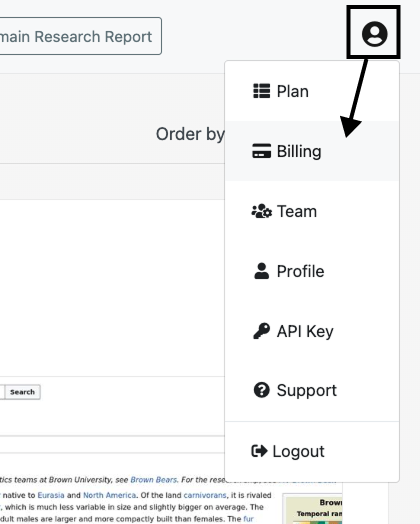
Note: If you've already cancelled your plan (or never had a paid plan), the Billing option will not be listed. If you'd like, you can still access the billing portal by visiting this link (must be logged in to PagePixels).
Cancel your plan
Click the Cancel subscription button.
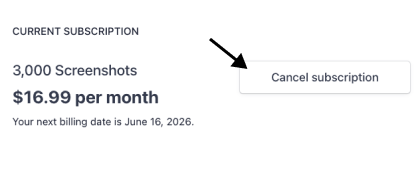
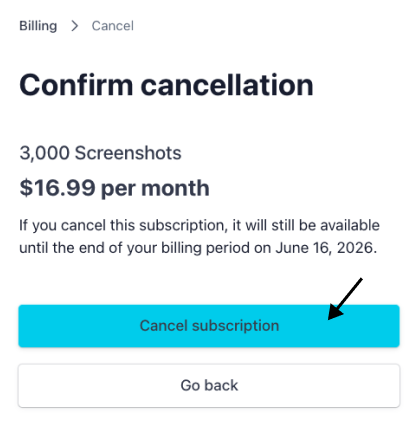
Click Cancel subscription again to confirm.
You may be asked why you cancelled. You can select a reason or click the No Thanks button.
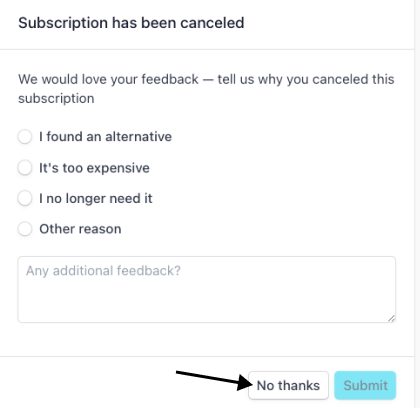
That's it. Your paid subscription is scheduled to cancel at the end of your current billing cycle.
Note: If you cancel your subscription within 1-2 hours of the time it renews, the charge may already be in motion and still occur. The subscription will instead automatically cancel at the end of the next billing cycle.