Multi-step capture engine

Automated website screenshots, on a custom schedule.

A screenshot API and no-code capture tool that logs in, clicks through, fills the form, and dismisses the cookie banner. Then it captures: on a schedule, with change alerts, a 48-month archive, and delivery to Slack, Dropbox, or any webhook.

25 free screenshots / month · no credit card · no phone number

From
1440 × 2400 PNG
Try it above

Paste a URL and hit Capture. The page will render the way a visitor in Hawaii actually sees it.
150+ locations are available in the live app.

. Try a domain like competitor.com/pricing.

Countries
US states
Reserving an exit node…
exit node: Hawaii
That is all the demo captures for today

Keep going with your own account. 25 screenshots a month, every feature included, on a schedule, from any Real Location.

Create a free account

No credit card · no phone number

Captured from Germany
idle · enter a URL above to try it out
Free Plan
25 screenshots every month to build against. No credit card, no phone number, and no gated features, so you can get started right away. Paid plans start at just $16.99/m for 3000 screenshots.
Advanced Scheduling
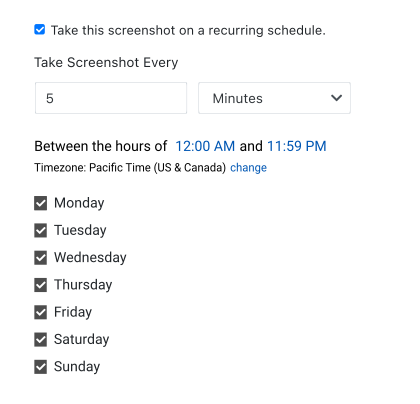
Schedule by time interval, days of the week, time of day, and time zone. No need to buy another tool to wire it up.
Every feature + Archiving
No need to pay more for advanced features. Every feature is fully functional on every plan, including the free plan. Multi-step, change alerts, AI analysis. Nothing is gated by tier.
Integrations + MCP
10+ integrations and a native MCP server are available to easily integrate PagePixels into your workflows.
01 / Multi-step capture

Multi-step screenshots for logging into websites, form submissions, and other multi-step sequences.

A login wall. A cookie banner. A tab you have to click. PagePixels runs a real browser session and executes your steps, in order, before the shutter fires.

Multi-step is available in the API and the web app. Every step is a parameter in the API, and every step is point-and-click in the web app. They have the same engine and same features - and both are available on every plan.

  • Log in with stored credentials
  • Click links, buttons, and tabs
  • Fill and submit forms
  • Run custom JavaScript and CSS
  • Strip cookie banners, ads, and trackers
POST https://api.pagepixels.com/screenshot_configs
{
  "url": "competitor.com/login",
  "scheduled_screenshot": true,
  "scheduled_every": 1,
  "scheduled_interval": "hours",
  "real_location": "Germany",
  "no_cookie_banners": true,

  "multi_step_actions": [
    { "type": "text_field", "selector": "#email", "value": "me@some-site.com" },
    { "type": "text_field", "selector": "#password", "value": "my-password" },
    { "type": "click", "selector": "button[type=submit]" },
    { "type": "wait_for_selector", "selector": "nav.dashboard" },
    { "type": "change", "selector": ".plan-price",
      "send_to": "webhook", "url": "example.com/hook" }
  ],

  "access_token": "your-api-key"
}
NPM · PyPI · RubyGem packages available
02 / Four front doors

Whether you write code or not, you get full access to every feature.

One engine sits behind all four access points. Nothing is API-only, nothing is locked to a higher plan.

Everywhere, on every plan
  • Multi-step capture
  • Scheduling
  • Change alerts
  • Real Locations
  • AI analysis

The same engine as a single POST. Every option is a parameter, with NPM, PyPI, and RubyGem packages ready to drop in.

Web app

No code

Build every step point-and-click in the Control Panel, set the schedule, and watch the captures land in your archive.

Zapier, Make, n8n, and Power Automate, so a capture can start or finish any workflow you already run.

MCP server

Agents

Every endpoint exposed as a native tool, so an AI agent can set up a watch and read back what changed on its own.

03 / Reliability

Use Real Locations, not datacenter IPs.

Captures run through a residential proxy network in the region you pick. So, geo-gated pricing, localized search results, and consent walls render the way a customer in that market actually sees them. This also improves captcha and other challenge screen issues.

Automatic retry · session persistence · per-run success logging

New York 97%
Germany 96%
London 98%
Australia 94%
04 / Delivery

Every integration and the MCP server are available on all plans.

See all integrations →
05 / Agents

The PagePixels MCP server enhances your agent workflows.

The PagePixels MCP exposes the whole API as native tools: snap, create_screenshot_config, list_all_change_notifications, and the rest. An agent can put a page under observation today and read back what changed next week. Remote Streamable HTTP, OAuth 2.1, so no browser to babysit and no API keys needed.

Connect mcp.pagepixels.com
agent · tool call
create_screenshot_config({
  url: "competitor.com/pricing",
  scheduled_screenshot: true,
  scheduled_every: 1,
  scheduled_interval: "hours",
  multi_step_actions: [
    { type: "change",
      selector: ".plan-price",
      send_to: "webhook",
      url: "example.com/hook" }
  ]
})

→ config_id: 827b7f5d-da55-44aa
→ job_id: fcdbe8a0b79965d8
06 / Custom HTML

Not everything worth capturing has a URL.

An email that landed in an inbox. A row in a private spreadsheet. A payload from someone else's API. None of it is a page you can point a screenshot tool at.

Send the HTML instead. snap_html renders it in the same browser as everything else and hands back an image, with every capture option still available.

Email

Screenshot a new Gmail or Outlook message the moment it arrives, straight from Zapier or Make.

Private data

Rows from a Google Sheet or Excel file that no anonymous browser could ever load.

Third-party APIs

Render a JSON response into something a human can actually read at a glance.

Reports & receipts

Build the markup, get back a dated image ready to file, email, or post.

POST https://api.pagepixels.com/snap_html 1 CREDIT
{
  "html_content": "<h1>Weekly numbers</h1>…",
  "page_width": 1080,
  "image_format": "png",
  "scale_factor": 2
}
returns an image
Weekly numbers
2026-07-27
1,284
Captures
31
Changes
99.2%
Success
report.png · 1080 × 720 @2x delivered to Slack
07 / Plans

Plans and pricing

Which plan do you actually need?

Plans are sized by screenshots taken, not by pages watched. Set your watch list and see where you land.

20
SCREENSHOTS / MO
600
SMALLEST PLAN THAT FITS
Screenshots / mo
Price
−17%
25 Free Your fit $0 Start free
3,000 Your fit $16.99 / mo Choose
15,000 Your fit $49.99 / mo Choose
30,000 Your fit $59.99 / mo Choose
50,000 Your fit $99.99 / mo Choose
70,000 Your fit $139.99 / mo Choose
100,000 Your fit $199.99 / mo Choose
200,000 Your fit $399.99 / mo Choose
Above the largest plan we price per job. Your fit Tell us the volume →
Every feature is on every plan: scheduling, multi-step, change alerts, AI analysis, and the full API. See full pricing →

Point it at a page. Walk away.

25 free screenshots every month. No credit card, no phone number.
Take a screenshot